




Valid till
Hrs
Mins
Secs
Valid till
Hrs
Mins
Secs
+91 95096 24545 (New Support Number)

Sales Workflow Automation for Organized Lead Follow-Ups

Our Clients

Trusted by Businesses Across Industries

What is Workflow Automation?

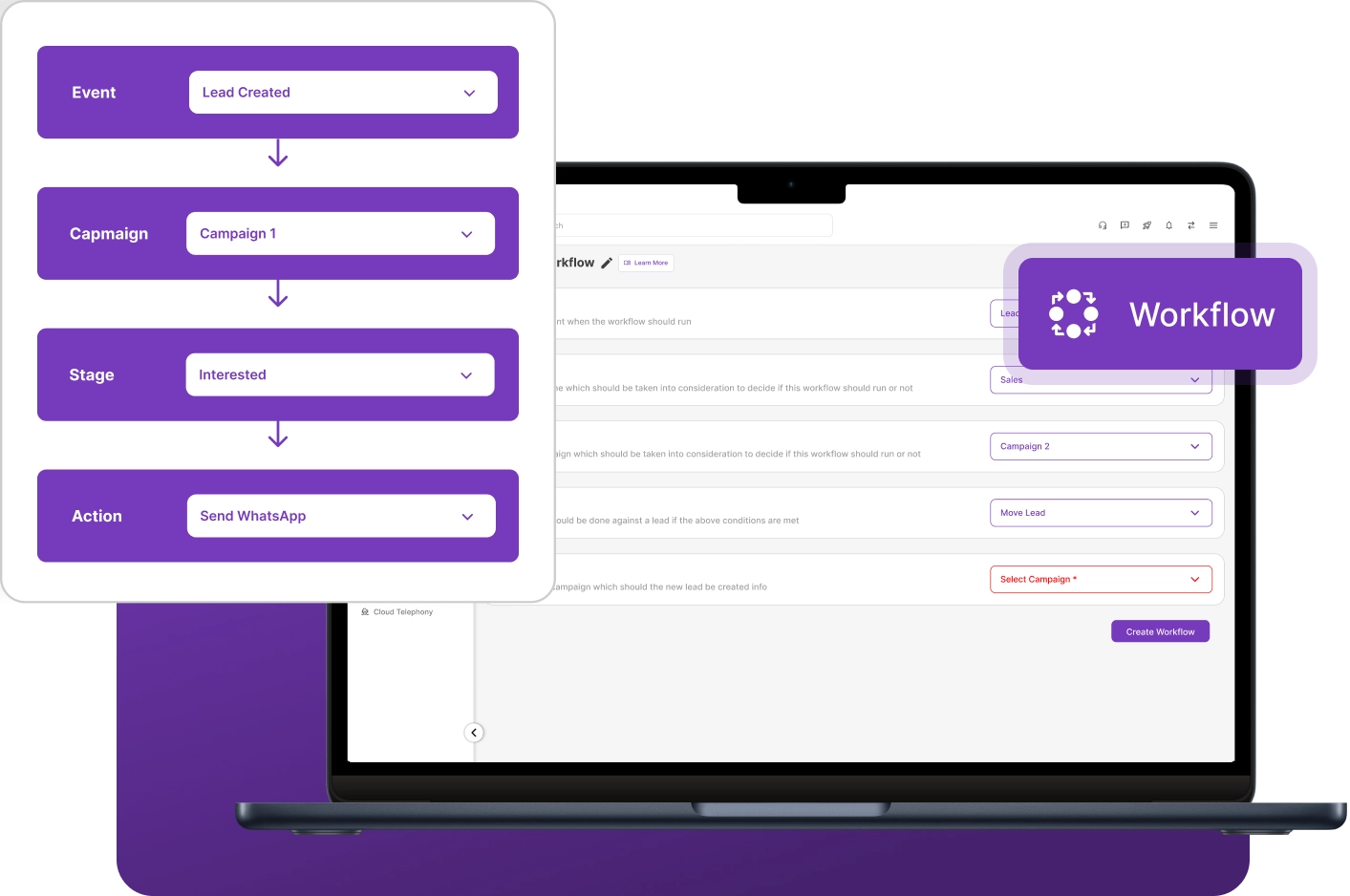
Workflow automation is the process of automatically triggering tasks, actions, or updates based on predefined rules. Instead of handling every step manually, the system executes activities automatically, helping businesses maintain structured processes, ensure timely actions, and reduce repetitive manual work through CRM workflow automation.

Sales workflow automation is a key feature of workflow automation that helps automate follow-ups, lead assignments, reminders, and sales activities. It reduces repetitive manual work and improves team productivity through CRM workflow automation.

Why Businesses Need a workflow automation tool?

Businesses often manage multiple leads, follow-ups, and sales activities daily. A workflow automation tool helps organize these processes by automatically triggering tasks, reminders, and updates. With sales workflow automation, teams can handle leads consistently while reducing manual tracking and missed follow-ups.

Without structured processes, sales teams may miss important follow-ups and updates. A workflow automation tool ensures that actions like lead assignment, reminders, and status changes happen automatically. By using CRM workflow automation, businesses improve efficiency and maintain consistent lead management across teams.

Introduces NeoDove Workflows for Automated WhatsApp Messaging

Transform WhatsApp messaging, improve customer engagement and watch conversions increase like never before!

Automate Sales Actions and Follow-Ups with Workflow Feature

Manage sales workflows more effectively with automated actions, timely follow-ups, and clear process visibility using a powerful sales workflow automation tool.

Automated Messaging

Automatically trigger messages to customers when specific actions occur within the workflow.

💬 “Automated messaging helped our team communicate with leads quickly without manual effort.

— by Sales Manager

Instant Follow-Ups

Ensure timely engagement by automatically triggering follow-up actions when lead activities occur.

💬 “Instant follow-ups helped our team stay connected with leads and improve response time.

— by Business Development Lead

Workflow Triggers

Trigger automated actions when specific conditions are met in the sales process.

💬 “Workflow triggers helped our team automate routine actions and keep processes organized.

— by Operations Manager

Workflow Progress Tracking

Track each step of the workflow to ensure every lead moves through the process without delays.

💬 “Workflow progress tracking helped our team stay on top of every step and avoid delays.

— by Sales Operations Lead

Turn Manual Sales Activities into Automated Workflows

Reduce manual work and automate critical actions across your sales process.

How Workflow Automation Tool Works

1

Set Workflow Conditions

2

Configure Workflow Actions

3

Execute Workflows

4

Monitor Workflows

Set Workflow Conditions

Define the rules and conditions that automatically initiate a workflow when triggered.

  • Workflow Setup
  • Trigger Conditions
  • Process Rules
  1. Define the conditions that initiate a workflow automation tool
  2. Set rules based on lead updates or system activities
  3. Configure when automated processes should begin

Setting workflow triggers ensures actions start automatically when defined criteria are met using CRM workflow automation.

Configure Workflow Actions

Set up the automated actions and steps that run when workflow conditions are activated.

  • Automation Setup
  • Action Configuration
  • Process Flow
  1. Define the actions that should run within the workflow automation
  2. Configure automated steps based on predefined rules
  3. Maintain a structured process for handling lead activities

Configured actions allow workflows to execute predefined processes automatically.

Execute Workflows

Let the system automatically run workflows as soon as defined conditions are met.

  • Automation Execution
  • System Triggers
  • Process Flow
  1. Workflows execute automatically when workflow triggers conditions are met
  2. System triggers initiate configured actions instantly
  3. Ensure consistent sales workflow automation execution

Automatic execution helps maintain structured operational processes.

Monitor Workflows

Track workflow activity and performance to ensure every automated process runs correctly.

  • Workflow Monitoring
  • Activity Tracking
  • Process Visibility
  1. Track workflow automation activity within the CRM
  2. Monitor automation processes and performance
  3. Maintain visibility into CRM workflow automation execution

Monitoring workflows helps teams ensure CRM workflow automation runs smoothly.

Key Benefits of Workflow Automation tool

Structured Activity Flow

Workflows organize sales activities into a clear sequence of steps, helping teams manage lead handling in a systematic and structured way through sales workflow automation.

Reduced Missed Actions

Automated workflow triggers ensure important steps in the sales process are not skipped, helping teams handle leads more reliably.

Process Standardization

CRM workflow automation establishes consistent procedures for handling leads and sales activities, helping teams maintain uniform processes across the organization.

Improved Response Rates

A reliable workflow automation tool helps teams respond to leads at the right time by triggering actions based on lead activity, helping businesses engage prospects more effectively.

Never Let a Lead Slip Through the Cracks

Automate lead follow-ups, task assignments, and workflow actions from one place.

Use Cases by Industry

BPO Companie

BPO teams use workflow automation software to manage large volumes of outbound and inbound calls through structured, repeatable processes.

Tourism Agencies

Tourism agencies use sales workflow automation to organize travel inquiries and booking discussions, helping teams manage requests more efficiently.

EdTech

EdTech companies can manage student inquiries and enrollments efficiently with a CRM for EdTech businesses and automated workflows.

Real Estate

Real estate teams manage property inquiries through structured CRM workflow automation, helping agents handle prospects with consistent operational steps.

We take pride in our success

40k+

Users

97%

Increased Efficiency

1000+

Easy Integration

50+

Industries Served

4.4/5

Avg User rating

100%

Data secure

Frequently Asked Questions

How does NeoDove's workflow automation tool help prevent missed sales activities?

NeoDove’s workflow automation tool automatically triggers follow-ups, task assignments, reminders, and customer communications based on predefined rules. This helps sales teams stay on top of every lead, reduces manual effort, and ensures important sales activities are completed on time without being missed.

Yes, sales workflow automation allows teams to automatically trigger automated messaging and follow-up actions when specific lead interactions or conditions occur.

No, NeoDove allows users to set up a workflow automation tool easily through simple configuration settings within the CRM, without requiring any technical expertise.

Yes, in NeoDove, workflow triggers can automatically initiate actions when lead activities occur, such as updates to lead details or customer interactions. This helps sales teams manage processes more efficiently without manually initiating every step.

Yes, CRM workflow automation workflows can be configured based on predefined conditions and actions that match your sales process. This allows teams to automate activities according to their specific operational needs.

Ready to Boost Your Sales Workflow Automation?

Join businesses that use our workflow automation tool to trigger actions automatically and manage lead activities without manual effort.

Tired of Wasting Time Dialing?

Boost your telecalling efficiency with NeoDove’s Autodialer. Act now and discover what you’re missing out on!
Request Demo l Exit Intent Pop Up Elementor l October 2024

By submitting this form, I give my consent to receive message/email/whatsapp/calls and updates to my number or email address

Call Smarter,
Close Faster!

100% Lead Capture, 75% More Efficiency, 2X Engagement!

Call Smarter, Close Faster! Form

By submitting this form, I give my consent to receive message/email/whatsapp and updates to my number or email address

Still using Excel sheets Switch to NeoDove

95% business who use NeoDove report 3x more profits!

50,000 +

Happy Customers

4.8

107k reviews

Request Demo l new popup still l june 2024

By submitting this form, I give my consent to receive message/email/whatsapp/calls and updates to my number or email address

Are you Still using Excel sheets for Manual Telecalling?

These outcomes and beyond can be yours.

0%

Lead Leakage

200%

Increase in call attempts

3x

More Engagement

    Request Demo

    By submitting this form, I give my consent to receive message/email/whatsapp and updates to my number or email address

    Popup - Request Demo l Home Page Auto Load Form l May 2024

    By submitting this form, I give my consent to receive message/email/whatsapp/calls and updates to my number or email address