




Valid till
Hrs
Mins
Secs
Valid till
Hrs
Mins
Secs
+91 95096 24545 (New Support Number)

CRM Dialer for Faster Sales Calling

Our Clients

Trusted by Businesses Across Industries

What is a Dialer?

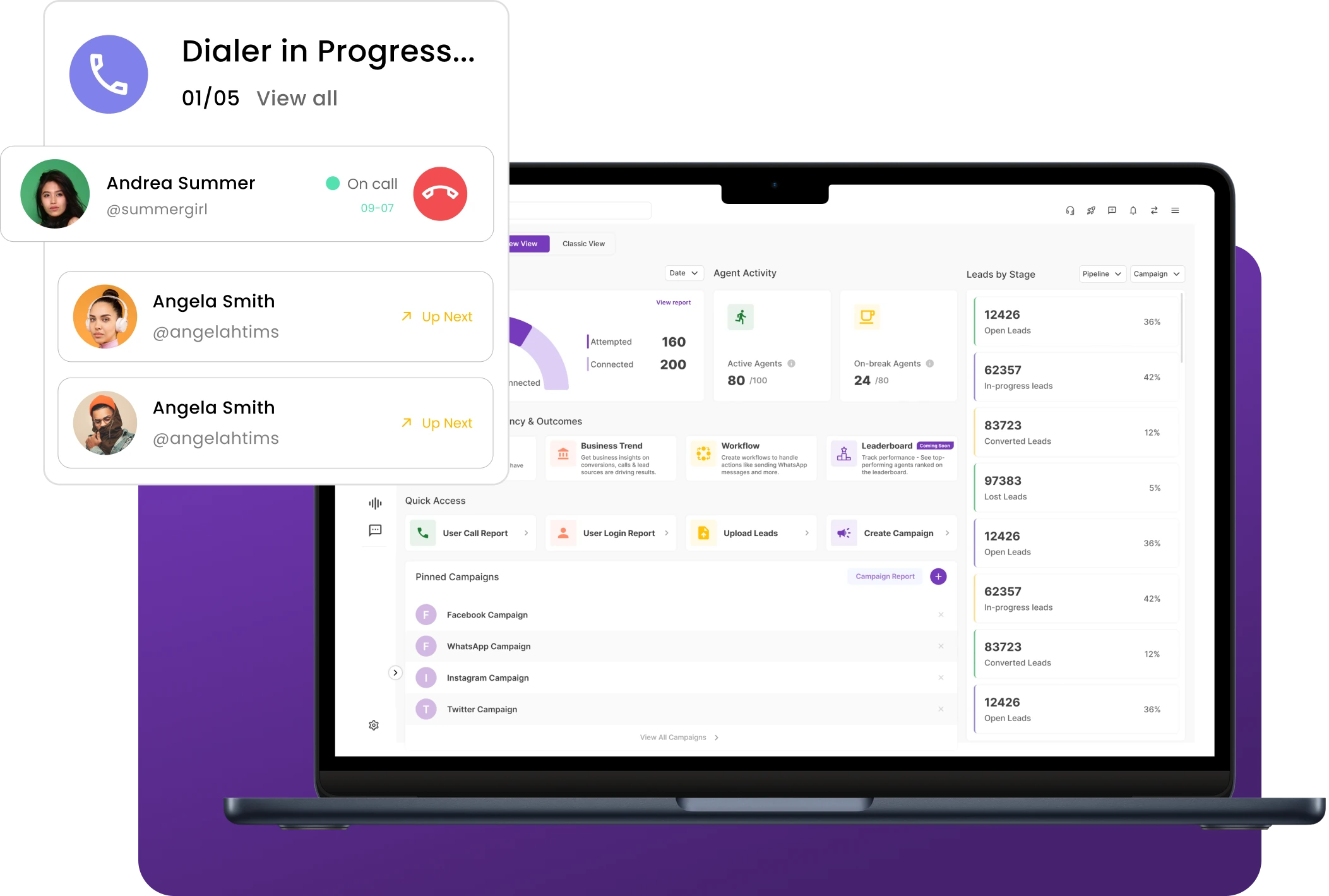
A dialer is a call automation tool that allows agents to start outbound calls directly from contact lists without manually dialing phone numbers. Phone numbers stored in CRM records or integrated platforms are automatically recognized, enabling agents to initiate calls quickly with a single click.

A CRM dialer supports instant calling, uses call routing to connect calls to the right agents, and includes call routing to connect calls to the right agents to manage high-volume calling workflows efficiently.

Why Do Businesses Need a Built-In Dialer?

Businesses that rely on outbound calling often manage large volumes of leads and customer contacts. Manually dialing each number slows down outreach and limits the number of conversations teams can handle. A dialer tool simplifies this process by enabling agents to start calls instantly from stored contact data using a CRM dialer, ensuring every interaction is automatically logged.

This improves call efficiency, reduces dialing errors, and ensures every interaction is automatically logged for future reference. As a result, businesses can reach more prospects, maintain consistent follow-ups, and manage high-volume customer communication more effectively.

Automatic and Progressive Dialer - Features and How it Works

Understand the key differences between automatic and progressive dialers and when to use each.

Powerful Dialer Capabilities for Modern Telecalling Teams

Essential capabilities designed to help teams connect with more leads faster and streamline outbound telecalling workflows with a powerful dialer tool.

Fast Calling

Accelerate outbound calling with a dialer tool designed to help teams connect with more leads in less time using Instant Calling.

💬 “Fast calling helped our team connect with nearly 3x more leads every day

by Sales Manager

Manage Calling Lists

Keep outbound calling organized by managing lead lists in a structured and efficient way.

💬 “Managing calling lists made our telecalling campaigns far more structured and efficient.

– by Team Lead

Auto Call Distribution

Automatically route calls to the right agents using smart call routing so teams can handle outbound and incoming calls efficiently.

💬 “Auto call distribution helped our team manage call volumes much more efficiently.

– by Operations Head

Auto Call Tracking & Recording

Capture every call automatically to maintain complete visibility into telecalling activities with built-in call tracking.

💬 “Call tracking and recording helped us maintain consistent call quality across our team.

– by Sales Supervisor

Lead History Tracking

Access complete lead interaction history to make every conversation more informed and effective.

💬 “Lead history tracking helped our agents have smarter conversations and close more deals.

– by Business Owner

Every Missed Call Is a Missed Opportunity

Faster dialing. Better follow-ups. Higher conversions.

How the Dialer Works

1

Import Leads

2

Assign Leads to Agents

3

Start Dialing

4

Track & Record Calls

5

Access Call History

Import Leads

Upload and organize leads to prepare your CRM dialer for calling.

  • Lead Upload
  • Contact Sync
  • Lead Import
  1. Import leads from Google Sheets integration and other sources
  2. Prepare contact lists for outbound calling
  3. Keep lead data ready for dialing campaigns

Organized lead data helps teams start calling faster.

Assign Leads to Agents

Distribute imported leads to the right agents before dialing begins.

  • Lead Distribution
  • Agent Queue
  • Call Allocation
  1. Automatically assign leads to telecallers with intelligent call routing
  2. Ensure each agent receives leads to call
  3. Maintain balanced calling workloads

Smart lead allocation keeps telecalling operations efficient.

Start Dialing

Initiate outbound calls instantly from the dialer tool with a single click.

  • One-Click Dial
  • Instant Calling
  • Fast Connect
  1. Start calls directly from the auto dialer software interface with Instant Calling
  2. Eliminate manual number dialing
  3. Connect with more leads quickly

Instant dialing improves calling speed and productivity.

Track & Record Calls

Automatically capture call details and recordings for every dialer session.

  • Call Tracking
  • Call Recording
  • Call Outcomes
  1. Automatically track call duration and activity using built-in call tracking
  2. Set reminders so telecallers never miss important calls
  3. Record conversations for monitoring and review

Automatic call tracking ensures complete call visibility.

Access Call History

Review past interactions and notes to prepare for every follow-up call.

  • Interaction History
  • Call Logs
  • Conversation Records
  1. View previous calls and conversation notes
  2. Understand past interactions before calling again
  3. Manage follow-ups with better context

Call history helps agents continue conversations effectively.

Benefits of Using a Dialer

Customer Data Capture

Capture and organize customer information during CRM dialer calls, helping teams maintain accurate contact data and interaction records.

Higher Conversions

Reach more prospects through faster outbound calling with the dialer tool and improved call routing, improving the chances of converting leads into customers.

Mobile Lead Capture

Respond quickly to leads coming from mobile users using dialer-based calling workflows, strengthening lead management with timely follow-ups and quick responses.

Better Segmentation

Use call tracking data and lead activity to group customers into segments and prioritize high-value prospects.

Make Every Call Count with a Smart CRM Dialer

Take your telecallers’ efficiency to the next level, get started with NeoDove today!

Use Cases by Industry

Travel Agencies

Travel agencies use dialers to quickly follow up with travel inquiries, confirm bookings, and manage customer calls efficiently during promotional campaigns.
Telecom & Internet Providers

Telecom sales teams use dialers to reach potential customers, promote new plans, and manage large volumes of outbound sales calls.
Manufacturing Companies

Manufacturing businesses use dialers to connect with distributors, suppliers, and B2B clients while managing sales inquiries and follow-ups.
Startups & Growing Businesses

Startups use dialers to reach prospects faster, follow up with leads consistently, and scale outbound sales efforts with limited teams.

We take pride in our success

40k+

Users

97%

Increased Efficiency

1000+

Easy Integration

50+

Industries Served

4.4/5

Avg User rating

100%

Data secure

Frequently Asked Questions

What are the advantages of using CRM software with a dialer?

Using CRM software with a dialer tool helps teams call leads faster, track call activities automatically, manage customer conversations in one place, and improve call routing efficiency. It improves calling efficiency and helps sales teams connect with more prospects.

Yes, NeoDove CRM Dialer lets you import existing contacts using spreadsheets and integrations. Once imported, you can organize leads, start 1-click calling, track conversations, and manage follow-ups from a single platform.

Companies need CRM with a dialer tool to manage large volumes of outbound calls, organize customer data, and improve follow-ups while reducing manual dialing.

A CRM with a dialer offers click-to-call, auto dialing, call recording, call logging, lead management, follow-up reminders, and performance reporting to improve sales productivity.

Close More Deals Faster with the
1-Click Dialer

Connect instantly, reduce delays, and keep your team focused on high-value calls.

Tired of Wasting Time Dialing?

Boost your telecalling efficiency with NeoDove’s Autodialer. Act now and discover what you’re missing out on!
Request Demo l Exit Intent Pop Up Elementor l October 2024

By submitting this form, I give my consent to receive message/email/whatsapp/calls and updates to my number or email address

Call Smarter,
Close Faster!

100% Lead Capture, 75% More Efficiency, 2X Engagement!

Call Smarter, Close Faster! Form

By submitting this form, I give my consent to receive message/email/whatsapp and updates to my number or email address

Still using Excel sheets Switch to NeoDove

95% business who use NeoDove report 3x more profits!

50,000 +

Happy Customers

4.8

107k reviews

Request Demo l new popup still l june 2024

By submitting this form, I give my consent to receive message/email/whatsapp/calls and updates to my number or email address

Are you Still using Excel sheets for Manual Telecalling?

These outcomes and beyond can be yours.

0%

Lead Leakage

200%

Increase in call attempts

3x

More Engagement

    Request Demo

    By submitting this form, I give my consent to receive message/email/whatsapp and updates to my number or email address

    Popup - Request Demo l Home Page Auto Load Form l May 2024

    By submitting this form, I give my consent to receive message/email/whatsapp/calls and updates to my number or email address